Retiring a Product Without Leaving Broken Links Behind
We retired one of our in-development apps this month. Taking a product off a website is quick. Doing it without leaving dead links, orphaned legal pages and forgotten test access behind takes a short checklist. Here is ours.
This month we retired DockPilot, a mobile app for managing Docker and Portainer servers that we had been building alongside ViewPane. It never shipped. The space changed a lot while we were working on it, with several good apps now covering it, some of them free, and we decided our time was better spent on the products people already use.
Deciding took a while. Removing it took an afternoon. Most of that afternoon went to the things that are easy to forget when a product page goes away, and those are what this post is about. The list works the same for a retired app, a discontinued service, or a client project you no longer show.
Find everything that points at it
Deleting the product page is the obvious step. The less obvious part is everything else on the site that knew it existed. For DockPilot that was:
- the project card and its detail page
- a privacy policy and terms page written for the app
- hero images, thumbnails and the link-preview image used when someone shares the page
- an entry in the sitemap
- mentions in two older blog posts
The quickest way to build this list is to search the whole site’s source for the product’s name, not just its URL. Images and share cards often use the name in their filename, and they won’t show up if you only search for links.
Redirect the old addresses, don’t just delete them
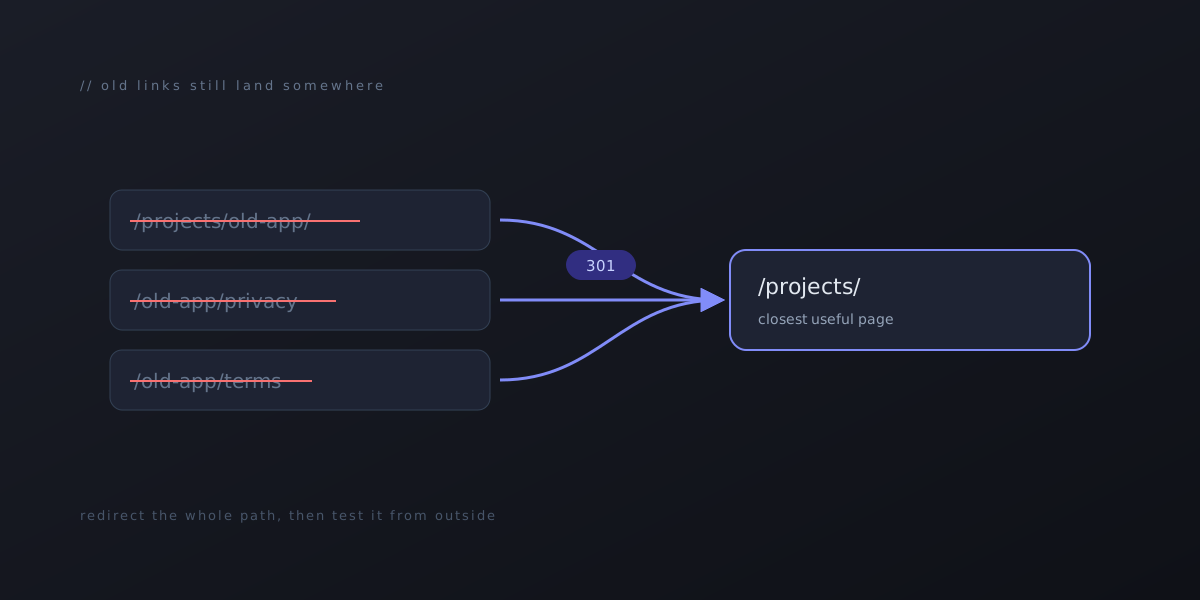
When a page disappears, anything that linked to it starts returning a “page not found” error. That includes search results, bookmarks, old social posts and other people’s sites. A permanent redirect (a 301) sends those visitors somewhere useful and tells search engines the page has moved on purpose.
Two rules we follow:
Redirect to the closest useful page, not the home page. Someone who clicked a link to DockPilot was looking at our projects, so the old addresses now go to our projects page. Dumping everyone on the home page works, but it reads like a broken link that happens to load.
Cover the whole path, not just the one URL. Products tend to grow sub-pages: privacy, terms, support, changelog. We redirected everything under the old addresses in one rule each, so a link to a page we had forgotten about still lands somewhere sensible.
After publishing, we checked the old addresses from outside the site and confirmed each one returned a 301 to the right place. It takes a minute, and it’s the only way to know the redirects actually work.
Legal pages: it depends on whether anyone used it
DockPilot never reached a store, so nobody ever agreed to its terms or had data handled under its privacy policy. Those pages could go, and we redirected them with everything else.
If a product did have users, we would keep its privacy policy up for a good while after shutting it down, with a note at the top saying the product has been retired and when. People are entitled to know how their data was handled, and app store records and old emails will keep pointing at that page long after the product is gone.
Leave old blog posts alone
Two of our earlier posts mention DockPilot, including one about why our apps are priced the way they are. We left both untouched.
A blog post is a record of what we were thinking when we wrote it. Quietly editing a product out of old posts rewrites that record, and readers who remember the original can tell. If an old post would actively mislead someone, a short dated note at the top is a better fix than deleting the paragraph.
Archive the code, don’t delete it
We marked the code repository read-only and added a note at the top of the README saying the project is retired and why. Nothing is lost. If parts of it are ever useful for another project, it’s all still there, and nobody will mistake it for something we’re still maintaining.
Close anything you opened to test it
This is the step that matters most and gets skipped most often. While building and testing a product, it’s common to open things up on a server: a port, an account, an API key, a test login. Those don’t go away when the product does.
Our check was simple. We went through what we had set up to test DockPilot and confirmed every piece of it was closed, then tested from another machine to make sure, rather than trusting the configuration. Access left over from a project nobody is working on is exactly the kind of thing nobody notices until it’s a problem.
Decide about the domain on purpose
If the product had its own domain, it will renew on its own schedule unless someone makes a call. Letting a domain lapse means someone else can register it and put whatever they like at an address that used to be yours, which still appears in old links and posts. Keeping it costs a small yearly fee and lets you redirect it. Either choice is reasonable. Not deciding is how a renewal date sneaks up on you.
The checklist
Here is the whole list in the order we did it:
- Search the site source for the product’s name and list everything that mentions it.
- Remove the product pages, images, share cards and sitemap entries.
- Add permanent redirects for every old address, pointing at the closest useful page.
- Keep or remove legal pages depending on whether the product ever had users.
- Leave old blog posts as they were, adding a dated note only if one would mislead.
- Archive the code read-only with a note explaining why.
- Close every port, account and key that was opened for testing, and check from outside.
- Make an actual decision about the domain renewal.
- Publish, then test the old addresses from outside the site.