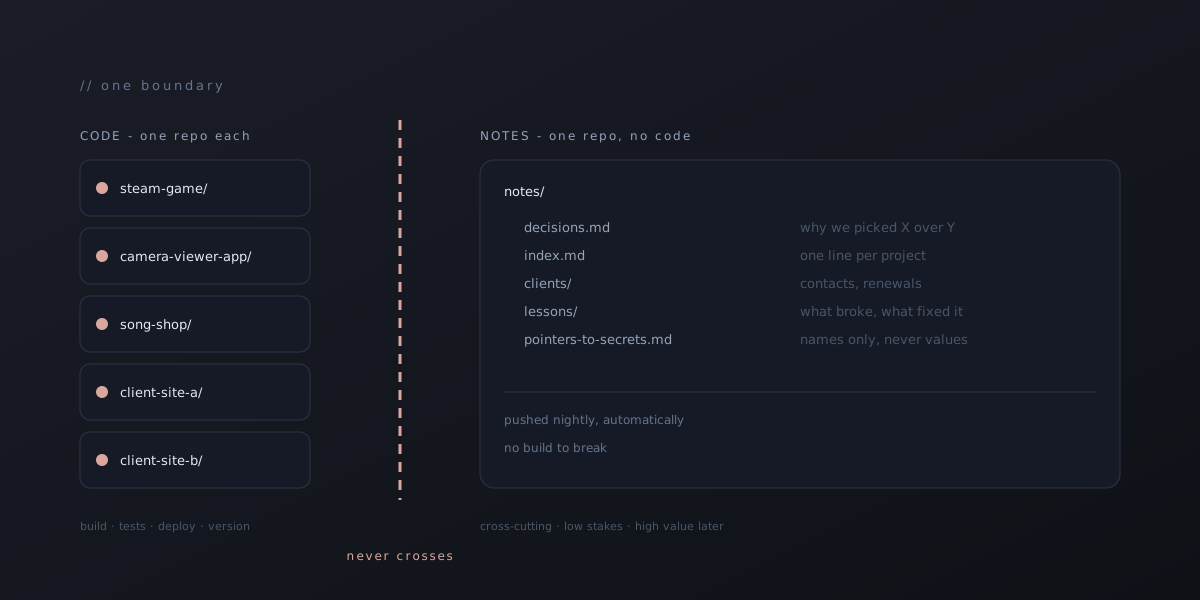
One Repo Per Project, Notes in a Separate One
How a small studio keeps six live products from tangling across two machines — the boundary that finally made "where does this go?" a question with one answer.
This studio ships a Steam game, two phone apps, a custom-song business, a handful of client sites and a couple of internal tools, and the whole thing is a small studio working across a desktop and a laptop. That is not a brag. It is the setup that produces a specific, boring kind of failure: you sit down at the other machine and the thing you were working on last night isn’t there.
For a few months we solved that badly. This post is about the rule that eventually solved it well, because it turned out to be less about tooling and more about drawing one line in the right place.
The failure, specifically
The first version of our sync setup was a single “notes” folder that got pushed to a private repo every night. It held decisions, credentials pointers, to-do lists, and the running context for every project. It synced fine. The problem was what it implied: because the notes were everywhere, it felt like the work was everywhere too.
It wasn’t. A React Native app that had been scaffolded on the laptop existed only on the laptop. The notes on the desktop described it in detail. The code was not there, the notes said nothing about that, and an evening got lost to discovering the gap. That happened more than once before the pattern was obvious.
The lesson was not “sync more things.” It was that we had two categories of file that behave completely differently, and we were treating them as one.
The two categories
Code is a project asset. It has a build, tests, a deploy target, a version, and a history that matters. It belongs to exactly one product. If it disappears, that product is broken.
Notes are a studio asset. They cut across every product: which Netlify plan expires when, why we chose one payment provider over another, the phone number for a client, the lesson from the outage last March. They have no build. Their history barely matters. If they disappear, nothing is broken today, but you lose the ability to make good decisions next month.
Once you say it out loud the separation is obvious, but the temptation to blur it is constant. It is very easy to drop a NOTES.md into a code repo, and very easy to paste a config snippet into the notes folder “just for now.” Both moves feel harmless. Both are how the tangle starts.
The rule
Three sentences.
- Every project is its own git repo, hosted remotely, from the first commit. Not “once it’s real.” A scaffold gets a repo before it gets a second file.
- Notes live in one separate repo that contains no code. Pointers to code, yes. Snippets to explain a decision, fine. But nothing in the notes repo is ever the only copy of something a build depends on.
- The remote is the source of truth for both. Neither machine is special. Push when you stop, pull when you start, on every repo you touched.
That’s it. Everything else in this post is consequences.
What the boundary buys you
“Where does this go?” has one answer. Does a build depend on it? Code repo. Would you want to know it in six months regardless of which project you’re in? Notes repo. We have not hit a file that didn’t sort cleanly, and the handful of near-misses (a deploy script, a client’s brand assets) resolved the moment we asked the build question.
The notes repo can be aggressive about capturing things. Because it has no build to break and no secrets in it, it can be pushed automatically on a timer without review. Ours goes up nightly. Meanwhile a code repo gets a real commit when a unit of work is done, tested and, if it ships, live. Different cadences, different standards, and neither compromises the other.
A machine can die. Both machines are disposable now. A fresh install is a clone of the notes repo and clones of whatever projects are active this week. We haven’t had to prove that under pressure yet, and the point of the rule is that we’d rather find out it works from a plan than from a dead drive.
Project switching gets cheaper. Each product’s repo carries its own to-do file at the top, and the notes repo carries a one-line index pointing at each product’s current state. Sitting down cold, the sequence is: read the index line, open the repo, read the to-do, work. No archaeology.
Client work stays walled off. Every client site is its own private repo. Nothing from one client’s repo is ever pasted into another’s, and their credentials never sit next to each other. The boundary that keeps our own products from tangling is the same one that keeps a client’s stuff theirs.
Where it gets awkward
An honest version of this post has to include the parts that fight back.
Shared code between products. Two of our apps share a fair amount of design and a few utility functions. The tempting fix is a shared package repo, and for a small studio that is usually a mistake: you have just added a third thing to version and a publish step between you and every small change. We copy the utility, note in the code comment where it came from, and accept the drift. If the shared surface ever grows past a few files, that’s the day it earns its own repo. It hasn’t yet.
Secrets. They are neither code nor notes. They live in a per-machine local file that is gitignored in the code repo and referenced, by name only, in the notes repo (“the Stripe key for this project is in the usual place under this name”). Setting up a new machine means re-entering secrets by hand once, which is annoying and correct.
The half-finished evening. The rule says push when you stop, but real evenings end mid-thought. We handle this with a stop hook that commits and pushes whatever is on the working tree to a parking branch, and a start hook on the other machine that picks it up. That automation has its own sharp edges, which will be its own post. The important part is that it exists because the rule exists: without a clear “code goes to the remote” rule, there is nothing for the hook to enforce.
The pull you forgot. The most common remaining failure is starting work on machine B without pulling, doing an hour, and then discovering machine A had pushed something last night. This is the one that still bites. The fix we’ve landed on is a start-of-session check that fetches every project repo and flags any that are behind. It doesn’t stop you from ignoring it, but it makes the silent version loud.
If you are a small studio with more than one project
You don’t need a monorepo, and you don’t need a wiki. You need one boundary and the discipline to keep it.
Make each project a remote repo before it has a second file. Make one more repo for everything that isn’t code. Never put code in the second one, never put the only copy of a note in the first, and treat the remote as the truth on every machine. Then automate the two moments the rule depends on, stopping and starting, so that keeping it costs you nothing on a tired night.
The result is not elegant. It is just a studio where “where is that?” has stopped being a question, which after months of asking it, turns out to be most of what we wanted.