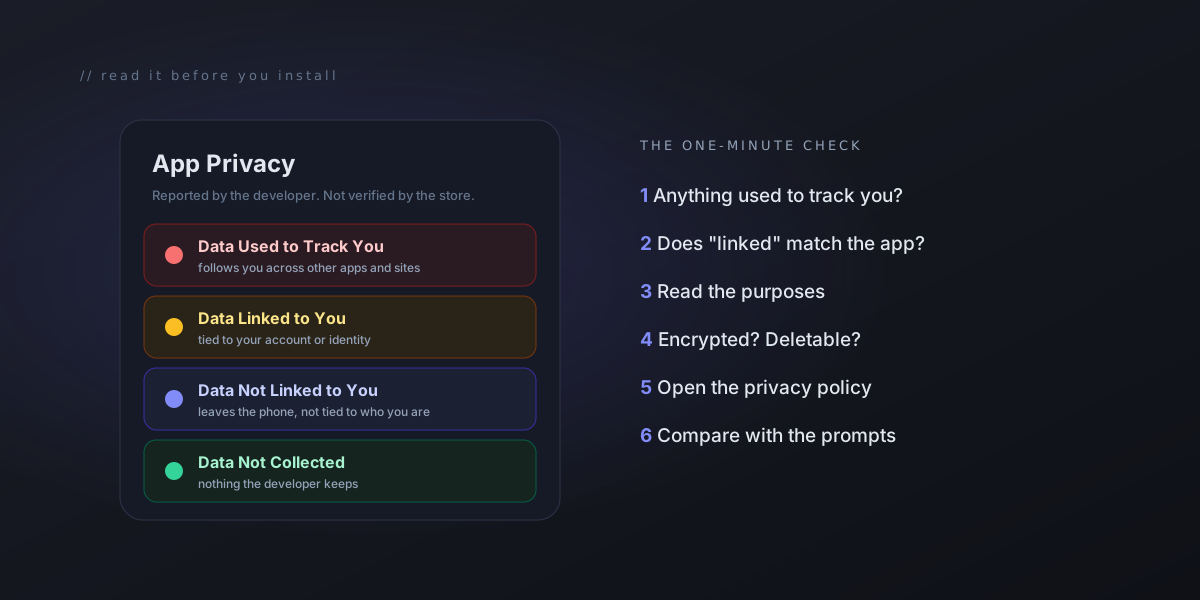
How to Read an App's Privacy Label, From People Who Fill Them Out
Every app in both stores carries a privacy label, and most people scroll right past it. We fill these forms out for our own apps. Here is what the answers actually mean, what the label cannot tell you, and a one-minute check to run before you install anything.
Scroll down any app’s page in the App Store and you will find a section called App Privacy. On Google Play it is called Data safety. Both stores require every app to have one, and almost nobody reads them. That is a shame, because in about a minute they tell you more about an app than its screenshots do.
We fill these forms out for our own apps, so we have seen the other side: the questions developers are asked, the definitions they have to work from, and the places where the label says less than it seems to. This post is the reader’s guide we wish came with them.
First: the label is the developer’s own answer
This is the single most useful thing to know, and the App Store says it right on the page. Under App Privacy, in small print: “This information has not been verified by Apple.”
Google’s developer guidance is just as direct. It tells developers they “alone are responsible for making complete and accurate declarations.” Google can block updates or remove an app when a declaration turns out to be wrong, but that happens after the fact.
So read a privacy label the way you would read a signed statement, not an inspection report. It is the developer telling you, on the record, what they do. That still has real value. A developer who writes something false on it is making a claim they can be held to. But it is a promise, not a lab result.
Apple’s four boxes, from most to least concerning
On an iPhone, the label sorts everything into up to four boxes. The order matters.
Data Used to Track You. This is the one to look at first. In Apple’s definition, tracking means linking data from this app with data from other companies’ apps and websites for targeted advertising or ad measurement, or sharing it with a data broker. In plain terms: this data helps follow you around, beyond this one app.
Data Linked to You. Data the developer collects and ties to your identity, such as your account, email address or a user ID. It is not necessarily used for ads, but it is attached to you.
Data Not Linked to You. Data that leaves your phone but is not tied back to who you are. Crash reports and anonymous usage counts often land here.
Data Not Collected. The developer says nothing leaves the device in a way they can keep.
Each entry also lists a purpose, like App Functionality, Analytics, Developer’s Advertising or Marketing or Third-Party Advertising. The purpose is often more telling than the data type. A location entry used for App Functionality in a weather app is expected. The same entry used for Third-Party Advertising is a different conversation.
What “collected” actually means
Here is a definition most people never see. For Apple, data counts as collected when it is sent off your device and kept by the developer or their partners for longer than it takes to answer the request it was sent for. Google’s definition is similar, and it excludes data that is processed only on your phone or that is end-to-end encrypted so the developer cannot read it.
That has two consequences worth knowing.
- An app can use the internet constantly and still honestly say little, if it does its work on your phone or passes data through without keeping it.
- An app with a short label is not automatically an app that never talks to a server. The label is about what the developer can keep and use, not about network traffic.
Google’s version reads a little differently
The Play Store’s Data safety section is built around three questions instead of four boxes:
- Data shared: what goes to other companies.
- Data collected: what the developer takes in.
- Security practices: whether data is encrypted in transit, whether you can ask for it to be deleted, and whether the app has had an independent security review.
One detail trips people up. On Google Play, sending data to a company that processes it on the developer’s behalf, such as a hosting or email provider, does not count as “sharing.” So “No data shared with third parties” means no data goes to other companies for their own use. It does not mean no other company ever touches it.
The part most people miss: the code inside the app
Most apps are not written entirely by the company that publishes them. They include toolkits from other companies for analytics, advertising, crash reporting, sign-in and more. Both stores require the label to cover what those toolkits collect too, not just what the developer’s own code does. Apple even counts it as tracking when an app includes an advertising toolkit that combines data across apps, whether or not the developer uses it for that.
From the developer’s side, this is where labels get long. Every toolkit added is another set of answers on the form. The honest way to keep a label short is to decide early not to include those toolkits at all, rather than to find creative readings of the definitions later.
That was the decision we made for ViewPane, our camera viewer app. It carries no analytics or advertising toolkits. Its App Store label has exactly one entry: Identifiers, under Data Not Linked to You, for App Functionality. That entry is the device address your phone needs in order to receive notifications, and it only exists if you turn alerts on. We could argue it is too small to mention. We listed it anyway, because it does leave the phone to deliver a notification, and the form asks about exactly that.
The lesson for readers: a good label is not necessarily an empty one. What matters is which box each entry sits in and what it is used for.
A one-minute check before you install
Next time you are about to install something, scroll down and run through this:
- Is anything under “Data Used to Track You”? For many kinds of app, like a calculator, a flashlight or a notes app, there is no good reason for anything to be there.
- Does “Data Linked to You” match what the app does? A map app linked to your location makes sense. A wallpaper app linked to your contacts deserves a question.
- Read the purposes, not just the data types. App Functionality is expected. Third-Party Advertising means your data is part of how the app makes money.
- On Android, check the security practices. “Data is encrypted in transit” and “You can request that data be deleted” are two lines you want to see.
- Tap the privacy policy link. If it is missing, broken or clearly written for a different app, treat the label with extra caution.
- Compare the label with the permission prompts. If the label says no location data is collected but the app asks for your location on first launch, the two should be consistent. The app may only use it on the phone, which is fine, but it is worth noticing.
What the label cannot tell you
A privacy label is a good first filter, not the whole story. It cannot tell you:
- How well the data is protected. A short label says nothing about how securely the app is built.
- Whether it is still current. Developers can change their answers at any time without shipping an app update, and a label can fall out of date if nobody revisits it.
- What the company does later. The privacy policy, not the label, is where things like data retention and what happens if the company is sold are spelled out.
Your phone can fill in some of the gaps. On an iPhone, Settings > Privacy & Security > App Privacy Report shows which apps accessed things like your location, camera and microphone, and which web domains they contacted. On recent versions of Android, the Privacy dashboard in Settings shows which apps used location, camera and microphone and when. And when an app asks for permission to track you, choosing “Ask App Not to Track” is always an option. Between those and the label, you have covered most of what an ordinary user can check.
Why we care about this from the other side
Filling out these forms honestly is easy when you have decided early what not to collect, and hard when you have not. Every entry on a label started as a choice someone made while building the app. We would rather make those choices in a way that leaves the label short and readable, and then list what is left plainly, even the small things.
If more people spent a minute on the label before installing, more developers would make those choices early too.