Before Your Nonprofit Pays Anyone for a Website, Read This
What a small organization's web presence should actually cost, the free programs most nonprofits never claim, the five things the organization must own outright, and the questions that separate a fair quote from an expensive one.
We have been hearing the same story from nonprofits for a while now. A volunteer built the site years ago and has since moved on. Nobody knows where the domain is registered. The monthly bill for the page builder went up again. The contact form stopped sending email at some point and nobody noticed until a donor mentioned it. Three quotes came in for a rebuild, they range from a few hundred dollars to five figures, and there is no way to tell which one is honest.
None of that is a failing of the organization. It is what happens when a thing built for free by a well-meaning person becomes infrastructure. This post is the conversation we would have with you before any money changes hands, written down so you can have it without us.
What the web actually costs
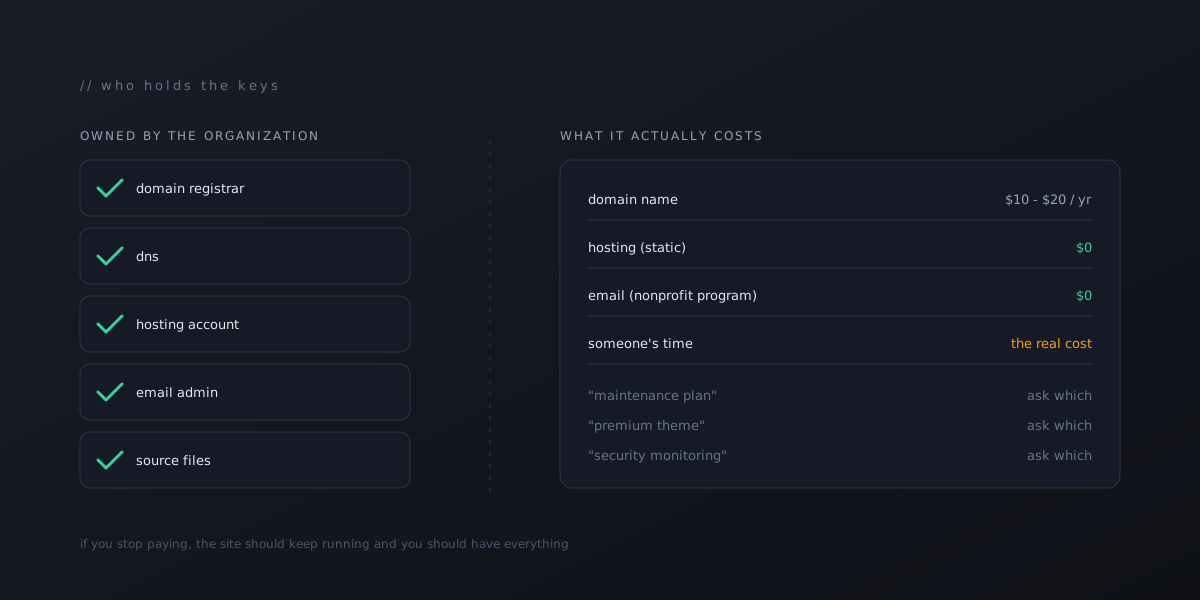
Strip away the vendor markup and a small organization’s web presence has four real costs.
A domain name. Roughly ten to twenty dollars a year at a plain registrar. If you are paying much more than that for the name alone, something is being bundled in.
Hosting. For a site that is mostly pages, images and a few forms, hosting can be free or nearly free. Several serious hosts offer static-site plans with no monthly fee, and they are not a compromise. They are faster and harder to break than the platforms that charge every month.
Email. You need mail at your own domain. Google and Microsoft both run nonprofit programs that make this free or close to it for eligible organizations. This is the one people most often pay full retail for without realizing a nonprofit rate exists.
Someone’s time. This is the real cost, and the honest one. Building the site, keeping it updated, answering when a form breaks. Any quote you get is mostly this, and a fair vendor will say so.
Everything else on an invoice, “maintenance plans,” “premium themes,” “SEO packages,” “security monitoring,” is either time relabeled or a product you may not need. Ask which.
The programs most nonprofits never claim
A registered nonprofit qualifies for a surprising amount of free and discounted software. The programs change their rules from time to time, so check the current terms, but as of this writing:
- Google for Nonprofits covers Workspace email for the organization at no charge and includes the Ad Grants program, which gives eligible nonprofits up to ten thousand dollars a month in Google search ad credit, with spending rules and account requirements attached. Most organizations we meet have never applied.
- Microsoft’s nonprofit offers include free Microsoft 365 Business Basic licenses, discounts on the higher Microsoft 365 plans, and yearly Azure cloud credits for eligible organizations.
- TechSoup is the clearinghouse that validates nonprofit status for many of these programs and lists discounts on everything from accounting software to laptops.
- Canva for Nonprofits gives the full design product free to eligible organizations, which covers most of the social graphics and flyers a small org produces.
If your web vendor has never mentioned any of these, that tells you something about whose budget they are optimizing.
Five things the organization must own
This is the part that matters more than the price. Whoever builds your site, the organization, not the builder and not a volunteer, must hold these directly:
- The domain registrar account. In the organization’s name, with a login at least two people can reach. Losing this means losing the name.
- The DNS settings. This is the control panel that decides where your domain sends website visitors and email. If a vendor manages it for you, get your own login to it and a written list of every record they set up, so nothing breaks if they disappear.
- The hosting account. Yours, with the vendor added as a collaborator, not the other way around.
- The email admin. Whoever administers mail at your domain can read, reset and delete every mailbox. That must be an officer of the organization.
- The source. The actual files that make the site. If the site lives inside a page builder that cannot export, you do not own it. You rent it, and the rent goes up.
A good builder will set all five up this way without being asked, and will hand you a one-page document listing where each one lives. If a vendor resists, that is the answer to whether you should hire them.
Questions that sort the quotes
When the estimates come in, ask each vendor these. The answers matter more than the totals.
- What is the monthly cost after launch, and what exactly does it cover? A fair answer separates hosting (often near zero) from their time (real).
- If we stop paying you, what happens to the site? The right answer is “nothing, it keeps running and you have everything.” Any other answer is a lease.
- Can we edit a page ourselves? You should be able to fix a typo or change a date without a ticket.
- Where do form submissions go, and how would we know if they stopped? A form that fails silently is worse than no form.
- Who holds the five accounts above? Have them list each one.
- What does the site look like on a phone? Most of your visitors are on one. Ask to see it, not hear about it.
You will notice none of these questions are about design. Design matters, but it is the easy part to judge and the hard part to get wrong in a way that costs money. Ownership and running costs are where organizations get hurt.
Why we wrote this down
We build software, and a share of the organizations that reach us are nonprofits with exactly the situation described at the top. We have set aside room for that work at reduced rates, and we put up a plain page explaining how it works, with no pricing and no pitch: campbellsoftstudios.com/nonprofits.
But the honest version of “we help where we can” includes helping you not need us. If this post lets you fix the form yourself, claim the free email, or pick the right one of three quotes, that is the outcome we were after. If it does not, and you want a second opinion or a hand, the page has a form and we read every one.