Launching viewpane.app: A Marketing Site Pulled From the App Icon
How we built the ViewPane marketing site, why the palette came from the app icon instead of a Figma library, and the rule we wrote down to stop ourselves from re-litigating it.
ViewPane’s marketing site is live at viewpane.app. It’s a small static Astro site — nine pages, no SSR, manual deploys to Netlify — and on the surface it’s a fairly typical product page. But getting to a design we were happy with took longer than building it, and the lessons from that process are worth writing down.
The first version was wrong
The initial scaffold of viewpane.app looked, frankly, like every other modern dev-tool marketing site. Dark background. Teal accent. Big radial gradient washing through the hero. Headline text with a multi-color gradient sweep. We’ve all seen this site a thousand times — because half of YC’s most recent batch ships it.
The problem wasn’t that it was ugly. The problem was that it didn’t look like ViewPane. It looked like SongStitched, our other product, which already uses dark + radial-gradient + teal-ish accent. Two different products with two different audiences should not visually rhyme just because we, the studio, defaulted to the same template.
So we threw it out and started over.
Going light didn’t work either
The second attempt swung the other direction — Linear-clean, light-first, off-white background, near-black type, a single cool accent. That’s a respectable look. We use it on this site. But on a product whose entire job is showing you live camera feeds in a low-light room, a glaring white marketing site felt off. It promised one thing visually and delivered another in the app.
We tried a warm cream. Still too bright. We tried a putty/kraft tone. Better, but it felt like we were reaching for an aesthetic instead of expressing the product.
The right input was the app icon
Eventually we asked the question we should have started with: what if the site looked like the app’s own icon?
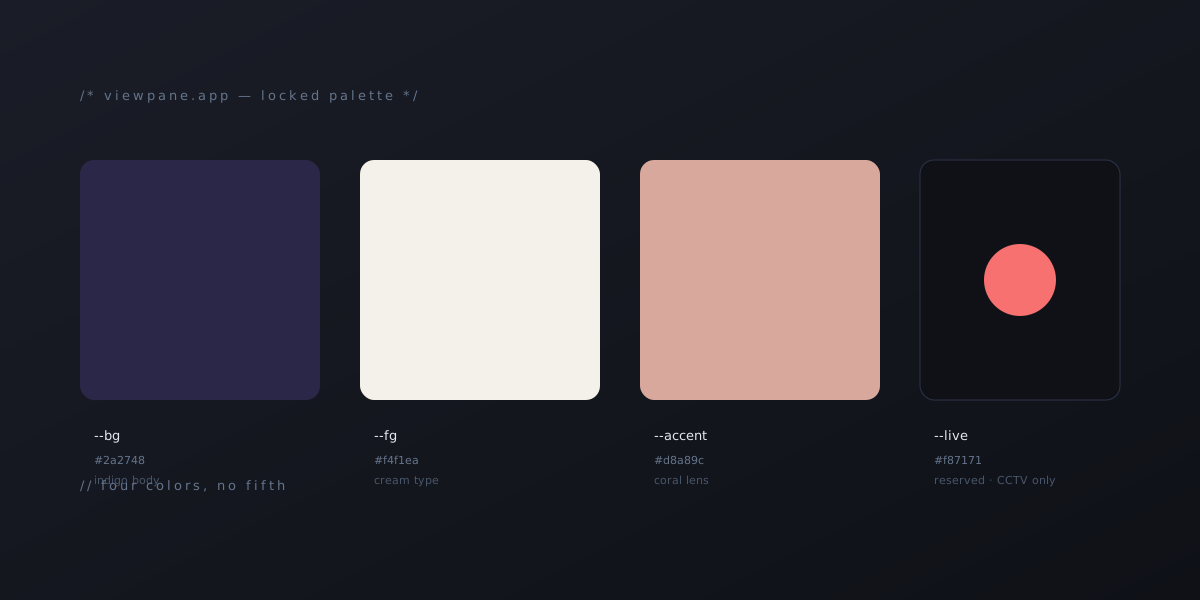
The ViewPane icon is a deep indigo body with a coral lens highlight and a cream type accent. We pulled those exact values into the site:
- Page background:
#2a2748— the indigo body of the icon. - Cards and surfaces: lighter indigos stepped up from there.
- Type:
#f4f1ea— the cream-tinted off-white that matches the icon’s lens highlight. - Primary accent:
#d8a89c— the coral lens highlight, used for CTAs, focus rings, and feature-icon chips. - Live indicators: a single saturated red, reserved exclusively for camera-status semantics (”● LIVE” badges in the phone mockup, the eyebrow pulse dot).
The minute we did that, two things became true at once: the site stopped looking generic, and it started reinforcing the brand instead of competing with it. When a user installs the app after visiting the site, the icon they see on their home screen is literally the marketing site, condensed. That’s not subtle, but subtlety wasn’t the goal — recognition was.
Four colors, no more
We wrote the palette down as a hard constraint: indigo, cream, coral, red. Four colors. Nothing else gets to enter the vocabulary.
The red is the strictest of the four. It only appears on surveillance semantics — the ”● LIVE” badge in the phone mockup, the pulse dot under the “Coming soon” eyebrow. It does not appear on errors, alerts, tags, or any general-purpose UI. Coral does that work. The discipline is the point: if red is the universal “this camera is watching right now” signal, it can’t also be the “form validation failed” signal. Reserving it preserves the meaning.
This kind of self-imposed scarcity is the cheapest design tool there is. You don’t need a token system or a design ops team — you just need to commit to a tiny vocabulary and not blink when you’re tempted to add a fifth color for a “nice to have” element.
The marketing-reflects-end-vision rule
There was a separate problem, less visual and more procedural. While editing copy, we kept catching ourselves second-guessing every claim. Does the app actually do this yet? Is the Pro tier wired up? Is the H.265 feature shipped? Halfway through writing a paragraph, we’d stop and audit it against the current state of the app, water down the language, and end up with copy that read like a hedge.
We wrote the rule down: the marketing site describes the product we are building toward, not the snapshot of what shipped this week.
That doesn’t mean lying. It means that if the product roadmap says “ViewPane will support multi-server federation in v1.2,” and the feature isn’t shipped yet, the site can describe federation as part of the product without burying it in disclaimers — provided it’s a real plan we’re committed to building. If a marketing claim doesn’t yet match the app, the gap goes into the project’s TODO file as work to finish before launch, not as a footnote in the marketing copy.
The discipline cuts the other way too: if we can’t or won’t commit to building something, it doesn’t go on the site at all. The site isn’t a wishlist. It’s a contract with our future selves.
The boring stack notes
Because someone always asks:
- Astro 5, static output, no SSR. Nine pages: marketing index, docs, press, privacy, terms, report-bug + thanks, blog index, blog post template.
- Hosted on Netlify at the apex
viewpane.app, withwww301’d to apex. The app’s source stays private until v1.0. - DNS through Porkbun with an ALIAS record on apex pointed at Netlify’s load balancer.
.appis on the Chrome HSTS preload list, which means the cert must be issued before a user can visit the URL — there’s no “click through” if the cert isn’t ready. We learned this by trying to share the URL five minutes too early.- No GitHub auto-deploy yet. Pushes don’t redeploy; we run
netlify deploy --prod --dir=distmanually after every change. That’s a deliberate tradeoff for now — the site doesn’t change often enough to justify wiring up the GitHub App, and the manual step gives us a sanity check before each deploy.
What we’d do differently
Honestly, mostly the order. We spent a couple of cycles iterating between dark/light/cream/putty/kraft before asking the obvious question — what does the app’s own brand look like? If you’re building a product that already has a logo or icon you like, that’s the input to your marketing site’s palette, not a separate brainstorm. Working from the icon outward took the design from generic to unmistakable in one move.
The real launch milestone for ViewPane is still ahead — store submission once our DUNS comes through. But the site exists, it looks like the app, and it’ll be ready to point real users at the day we flip the switch.
Update, May 12: the DUNS number came through a week after this post went up. Store prep is now underway.