The Billing Bugs That Only Hurt Paying Customers
Everyone audits the paywall for freeloaders sneaking through. The costlier bugs are the ones that take someone's money and then fail them. Four we caught before launch.
We’ve written before about adversarially auditing money-touching features before they ship. When we wired the subscription paywall into ViewPane, we ran that playbook again — and the first pass came back clean in the direction everyone instinctively checks. No free user could sneak past any of the five feature gates. The paywall held.
Then we flipped the question: forget the person trying not to pay. What happens to the person who did pay?
That direction turned up four real bugs. Every one of them would have taken a customer’s money and then failed them — which is worse than a leaky gate in every way that matters. A freeloader slipping through costs you a theoretical $9.99. A subscriber who gets locked out of what they bought costs you a refund, a one-star review, and the trust of the exact person who chose to fund your work.
Here’s what we found, generalized so you can hunt the same four in your own app.
1. The offline lockout
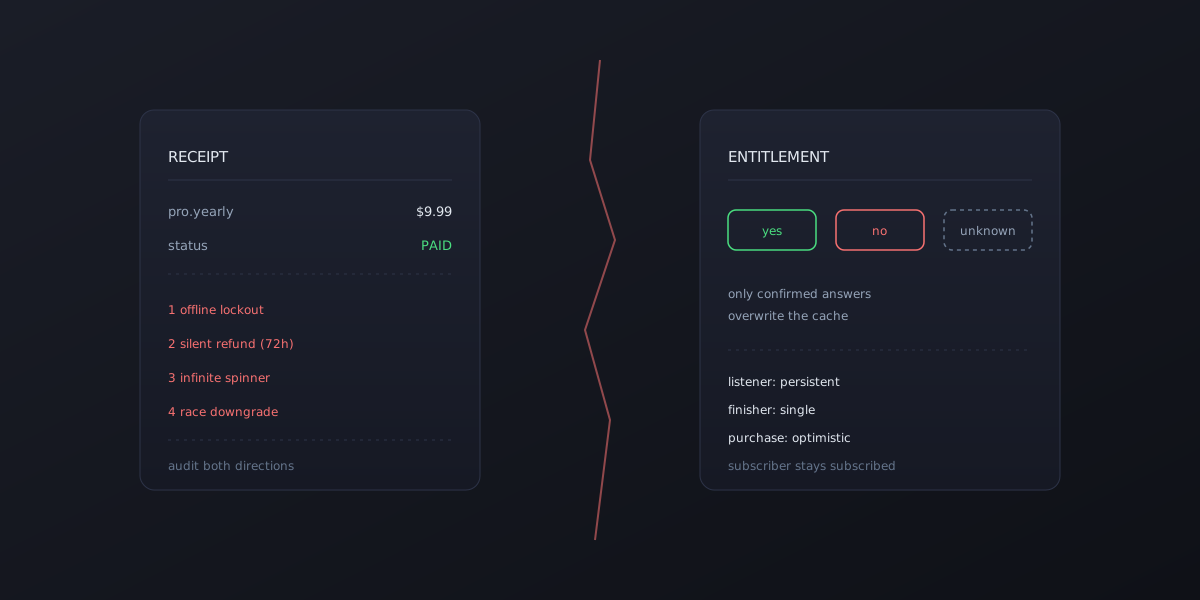
Our entitlement check asked the store “is this subscription active?” and cached the answer. Sensible — until you ask what the code does when the store is unreachable. Airplane mode, flaky hotel Wi-Fi, a store outage: the query fails, and a naive implementation treats “couldn’t confirm” as “not subscribed” and overwrites the cache. Your paying customer opens the app on a plane and every Pro feature is locked.
The fix is to make the store answer three-valued: yes, no, or unknown. Only a confirmed answer is allowed to overwrite the cached entitlement. An unknown leaves the last known-good state alone. A subscriber stays a subscriber until the store explicitly says otherwise.
2. The three-day silent refund
On Google Play, a purchase you don’t acknowledge gets automatically refunded after three days. Most IAP tutorials acknowledge the purchase in the buy-button flow — which works only if the purchase completes while that screen is mounted. Slow payment methods, app restarts mid-purchase, purchases approved hours later: the completion event arrives when your paywall component is long gone, nobody acknowledges it, and three days later Google quietly takes the money back and revokes the subscription. Your customer paid, used the app happily, and then got downgraded for a reason neither of you can see.
The fix: register one persistent purchase listener at app startup — not inside the paywall — whose job is to acknowledge every delivered purchase, no matter when it lands or what screen is showing. And make it the only place that finishes transactions, so you never double-handle one.
3. The infinite spinner
Some purchases don’t resolve in seconds. A pending payment method can take minutes or days. If your buy button awaits the purchase result before dismissing its spinner, a pending purchase wedges the paywall forever, and the customer’s only option is to force-quit an app that is, as far as they know, eating their money.
The fix: time the interactive wait out (we used 90 seconds), tell the user the purchase is pending and safe to leave, and let the persistent listener from bug #2 catch the eventual approval whenever it arrives.
4. The post-purchase downgrade
Right after a successful purchase, it’s tempting to re-query the store to “confirm” the new entitlement. But stores are eventually consistent — a query fired seconds after purchase can still report the old state, and if that answer overwrites your entitlement, you’ve just shown someone a lock screen moments after charging their card.
The fix: be optimistic at the moment of purchase. The store just told you the purchase succeeded — that is the confirmation. Grant the entitlement immediately and let routine checks reconcile later, under bug #1’s rule that only confirmed answers can downgrade.
The pattern
All four bugs share a shape: they live in the gap between the happy path and how billing actually behaves — offline devices, deferred payments, eventual consistency, platform-side refund timers. None of them show up when you test “tap buy, see Pro unlock” on a good connection. All of them show up in production, attached to a credit card charge.
So when you audit a paywall, run both directions. Attack it as the person who won’t pay. Then attack it as the person who did — on a plane, with a pending payment, the day after a store outage. The second attacker is the one whose money you’re already holding.